CASE STUDIESPersonal project
Tibia Key Presser: game hotkeys pressed in the background
A small Python tool that presses hotkeys in Tibia while the game window is minimised. Two years later, on the next pass over the project, out came a loop with no sleep, a Stop → Start race and concurrent key sending on one window.
- When
- 2024–2026
- Role
- Author: app, build, ongoing development
- Stack
- PythonTkinterpywinautoPyInstallerpytest
8
keys, each with its own delay
100 ms
maximum reaction time to Stop
780
lines of Python in the starting version
Problem
Tibia has repetitive actions behind hotkeys: healing, mana, runes. I wanted a program to press them for me at a steady rhythm, also while the game window is minimised and I am doing something else. Simulated keyboard input goes to the active window, so the tool has to target the specific game window, not whatever has focus.
The first version from September 2024 worked but had bugs I only saw on returning to the project in October 2026. Tkinter reports key names (Return, space, comma) that pywinauto does not know; an unknown key threw an exception, the code treated it as a lost window, reconnected and tried again. A loop with no sleep at all, a traceback every iteration and no signal in the UI. Stop and Start less than 100 ms apart resurrected old threads, because there was one stop event for the app’s whole lifetime. Colours, limits and paths lived in three places at once.
Approach
Keys go through pywinauto to a window handle found by title, “<client> - <character>” (a regular expression, with an optional clients.txt for other servers), not to the active window. Every key has its own thread with an absolute time for the next press, so the overhead of window lookup and sending never accumulates into drift. Sleep is cut into 100 ms slices so Stop reacts at once, and the window handle is re-validated every 5 seconds.
Before touching the code I wrote the analysis down: bugs with severity, duplication, dead code, a staged plan of changes and open decisions. I checked pywinauto’s behaviour in the sources of version 0.6.9 instead of assuming what it does.
Solution
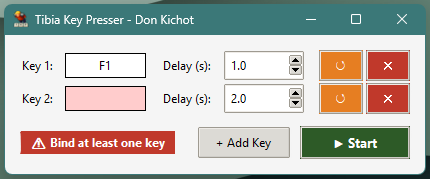
- A keys.py module: a pure function translating tkinter key names into pywinauto codes (Return to ENTER, Prior to PGUP, punctuation to characters, the whole numpad), while modifiers alone do not bind, so Shift+F1 binds F1. Validation at bind time: an unsupported key is a red field and a message, with no way to start. Six pytest tests.
- The send loop waits an interval after a failed send, so a persistent error never becomes a busy loop.
- One source of truth: theme.py for colours, fonts and ttk styles, paths.py for paths in source mode and inside the .exe, so the icon no longer depends on the current directory.
- Tooling: pyproject with uv, ruff and pytest, a single-file .exe build through PyInstaller, clients.txt for OTS servers.
- Planned, not yet done: one scheduler thread instead of a thread per key. In pywinauto’s sources a send is SetKeyboardState and AttachThreadInput on the shared input queue, with no lock, so two threads with overlapping due times can overwrite each other’s keyboard state. Serialised threads have the same throughput as one scheduler, and Stop becomes set and join.
Result
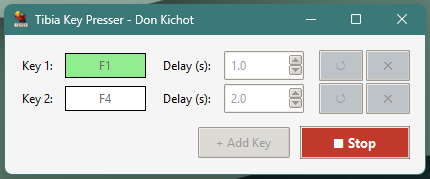
Up to eight keys with independent delays, works with the game minimised, stops within about 100 ms and shows the character name in the window title. One .exe, no installation.
What I learned
- An exception caught as something else (an unknown key as a lost window) creates loops the UI never sees. Every error branch needs its own reaction and its own wait.
- Returning to your own code two years later starts with a written analysis, with severities and a plan. Changes made on the side cost more.