CASE STUDIESPersonal project
Polonez Autodrive: the evolution of an interactive 3D colouring book
The first version of this synthwave colouring book with a mini-game had 16 P0 bugs, three independent clocks and controls tied to the monitor refresh rate. An analysis of the first version, the move from plain JS and HTML to Vite on a new skeleton, and a procedural scene in place of FBX files.
- When
- 2024–2026
- Role
- Author: 3D models, code, UI, deployment
- Stack
- Three.jsVanilla JSGLSL3Ds MaxViteVitest
16
P0 bugs found in version 1
121
unit tests in version 2
−29%
draw calls per frame after limiting shadows
Problem
The first version from 2024 worked but aged badly: Three.js r116, plain JavaScript without a bundler, a 600-line GUI of copy-pasted code. The analysis of the first version I did in October 2026 listed 16 P0 bugs. Three independent clocks (the game loop, a separate requestAnimationFrame per object and setTimeout) made the car steer 2.4 times faster on a 144 Hz monitor than on 60 Hz. The loading bar was a fiction of 2 to 8 second timers and showed “Infinity%” under gzip. Add GPU leaks without dispose, a hitbox larger than the model, a wireframe kept as a separate clone synchronised by hand, and the same FBX file loaded twice.
A second problem surfaced with the library upgrade: the new FBXLoader triangulated the non-planar quads of the hills with earcut and lost 37 of 252 triangles. Models from 3ds Max came back with cameras in the hierarchy and wheels with an off-centre axle, so the tyre wobbled as it turned.
Approach
Rather than patch the old code in place, I moved the project from plain JS and HTML to Vite on a new skeleton: since the library upgrade touched every file, the old code was worth more as a specification than as a base. I tagged version 1, took reference screenshots and reached feature parity on Three.js r186 with Vite in seven phases, then added new things.
The skeleton of version 2 is one loop on THREE.Timer with the delta clamped to 0.1 s and connected to the document so a hidden tab does not jump on return; a pure game state machine (idle, free, countdown, playing, gameover); loading through LoadingManager and Promise.all with real progress; one config file as the source of the palette, layers, gameplay parameters and copy.
Solution
- A custom FanFBXLoader swaps the triangulation for a fan, the way r116 did, so the hills come back complete. A pruning function removes cameras from the export and wheels are centred on their axle after loading.
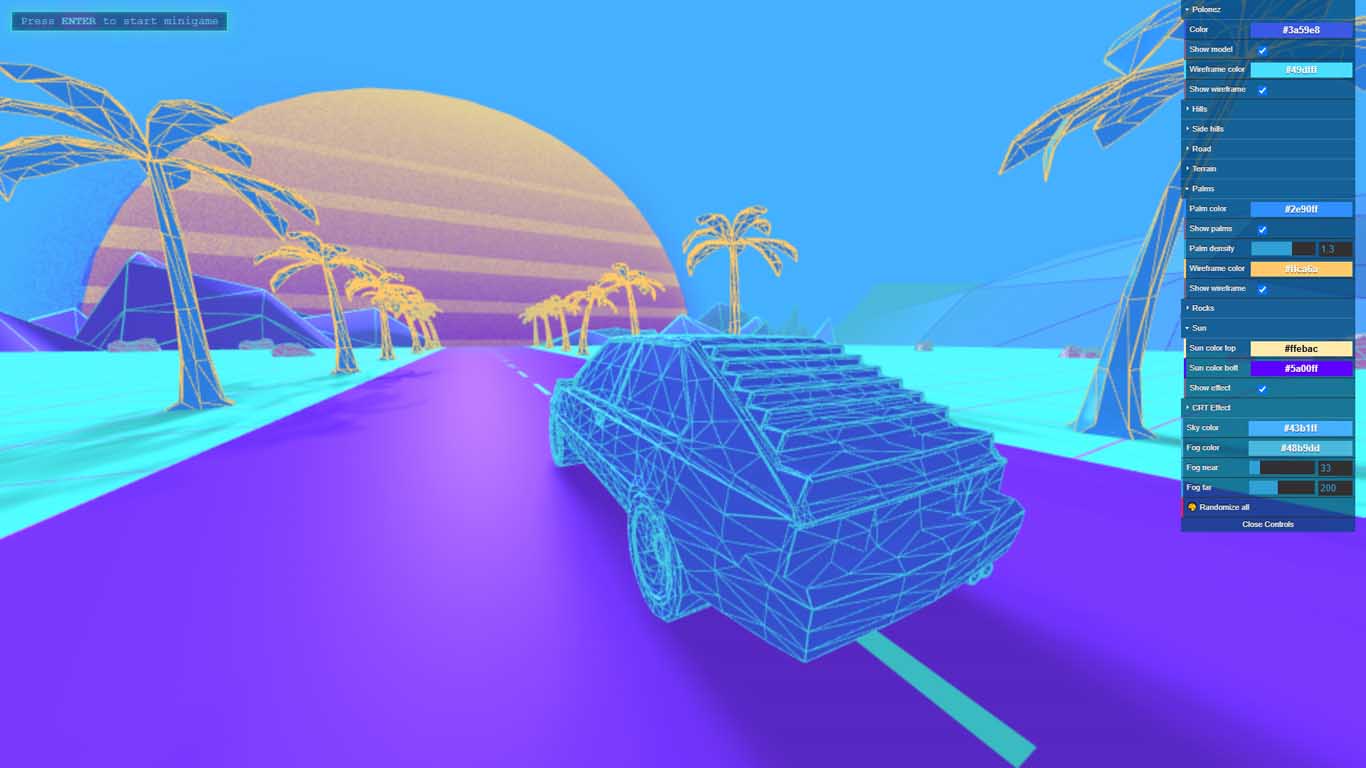
- A procedural scene instead of files: seeded simplex noise with ridged fBm, a height grid split along the diagonal with the smaller height difference (ridges instead of a pattern), hill chunks as a conveyor belt growing ahead of the car and sinking behind it, a mountain range parted in front of the sun for the road, a city of 175 towers with its own fog.
- Real-time colours: lil-gui built in a loop from the layer config, random palettes from colour schemes (complementary, triad, split, analogous) with the line-to-fill contrast kept at 3:1 or better, a one-second tween, and the HUD and panel taking the scene’s hue.
- Wireframe computed in a shader with an edge-distance attribute: width in world units and fading of small triangles, because GL lines are 1 pixel wide and distant palms blurred into a blob. Selective bloom on its own layer.
- Mini-game: hitbox computed once per model, car bounds once per frame, a pool of cloned materials for fades, because dispose on spawn caused a 40–70 ms hitch.
- Touch: on-screen buttons with setPointerCapture, a minimum 70° horizontal FOV in portrait and a camera that slides sideways with the car.
Result
Version 2 is about 5.6k lines of JavaScript typed with JSDoc, 121 unit tests in 23 files and CI that checks types, tests and the build on every push. Shadows limited to the car’s surroundings removed 18 percent of triangles and 29 percent of draw calls per frame. About 1.9 MB of dead files left the repository, including 820 kB of sun and grid PNGs that shaders now compute.
What I learned
- One loop and one source of data remove whole classes of bugs, not single ones.
- Moving a project onto a new skeleton can be cheaper than patching it in place when the upgrade touches every file anyway. The condition: the old code stays as the specification, with a tag and reference screenshots.